It starts with an idea.
Black background. Red accents. Big block letters saying “Black Friday. 25% off sitewide.” During Black Friday and Cyber Monday, that visual language gets very familiar. Another version can be easy to scroll past.
I wanted to give someone a reason to look before asking them to shop.
For this concept, I chose the analog era: tactile materials, old machines, printed paper, and a little nostalgia. It fits a wider return to retro visuals and simpler technology, reflected in Adobe’s Retro Active trend coverage.
My starting question was simple: where would you never expect to see this product?
A suitcase in a vintage photo booth. A luxury luggage campaign coming out of an old office printer. The unexpected setting gives the product a different way to show up.
Build your reference board on Pinterest
Search for things like “vintage photo booth,” “1990s office printer,” “analog advertising,” and “retro aluminum interiors.” Save references for the shape of the machine, lighting, materials, colors, and camera angle. Write down what you like about each one.
Keep a clear photo of your actual product alongside those references. The inspiration sets the scene. The product photo tells the AI exactly what it needs to preserve.
Ask ChatGPT for the prompt. Then read it.
A prompt review can catch avoidable mistakes before you spend generation credits. If you cannot picture how the scene works, the prompt needs another edit.
Give ChatGPT your product image, your selected references, and the idea. Explain where the product belongs, which details must stay accurate, where the offer should appear, and the format you need. Ask it to show you the prompt before generating anything on Higgsfield.
- Product: Are its proportions, material, color, handles, wheels, and branding preserved?
- Scene: Can the objects physically fit and interact the way the prompt describes?
- Offer: Is the copy exact, short, and placed somewhere readable?
- Composition: Will the product still stand out on a phone screen?
Edit anything that does not make sense. Only then ask ChatGPT to generate the image on Higgsfield, if you have it connected, or use the approved prompt directly in your image tool.
The product still has a job to do.
The vintage prop should help sell the product. If someone remembers the machine but cannot tell what you are promoting, the composition needs work. Keep the product recognizable, give it enough space, and make the offer easy to find.
Turn the idea into your own campaign.
Make these prompts yours.
These are customizable versions of the concepts in this guide. Replace the bracketed fields with your brand, product, materials, offer, and format. Attach the references listed above each prompt. Ask ChatGPT to review your completed prompt before you generate.
For the example shown here, the product is RIMOWA luggage, the booth finish is silver grooved aluminum, and the offer is “15% off” for “24 hours only.” Use your own confirmed offer.
Start here: ask ChatGPT to write your campaign prompt
Attach your product photo and selected Pinterest references.
Write a still-image prompt for a [BRAND] [CAMPAIGN NAME] campaign.

The product is [PRODUCT]. My idea is to place it in [UNEXPECTED ANALOG SETTING], where [ONE SIMPLE CREATIVE ACTION].
Reference 1 defines the product’s form, proportions, and design.
Reference 2 defines the vintage object’s form.
Reference 3, if supplied, defines [MATERIAL / COLOR / LIGHTING ONLY].

Keep these locked: [PRODUCT DESIGN], [PRODUCT COLOR AND FINISH], [KEY COMPOSITION REQUIREMENT].
The product must be the focal point. The vintage object supports the product reveal.
Exact campaign copy: “[CAMPAIGN NAME]”, “[OFFER]”, “[TIME LIMIT]”. Place it on [SPECIFIC SURFACE].
Format: [ASPECT RATIO]. Brand tone: [THREE STYLE WORDS].
You may improvise [BACKGROUND OR MINOR DETAILS].

Show me the prompt first. Flag anything physically unclear, contradictory, or too complicated for one image. Do not generate until I approve.
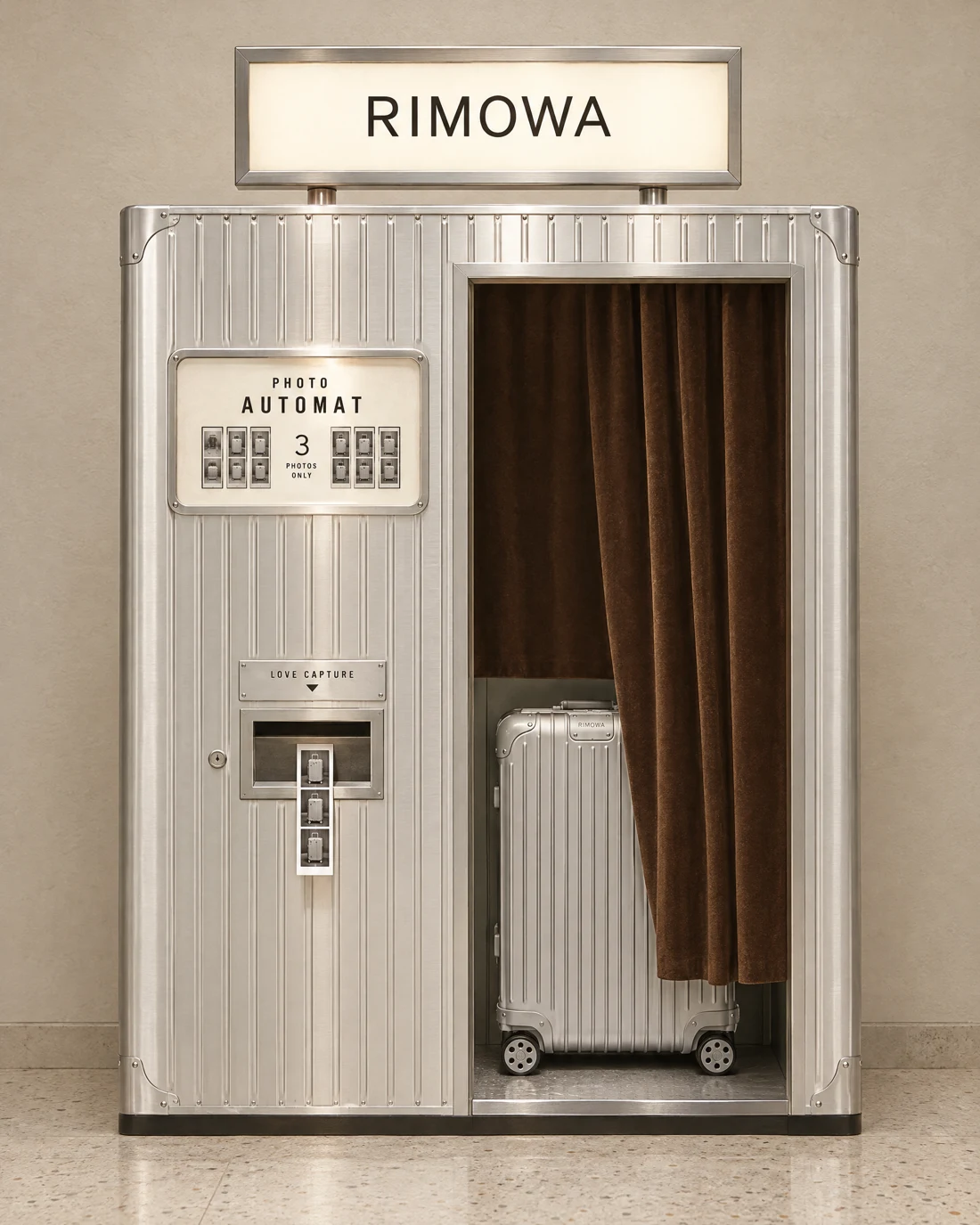
A photo booth dressed in RIMOWA.
I imagined a vintage photo booth wrapped in the silver color, metallic finish, and signature vertical grooves of RIMOWA’s aluminum luggage. The name for that texture is grooved aluminum.
The booth borrows the product’s visual identity, while the suitcase appears inside. The promotion lives on the booth’s left panel and photo strip.
Independent AI campaign concept. The 15% offer shown here is illustrative, not a live RIMOWA promotion.
Keep the good image. Specify the change.
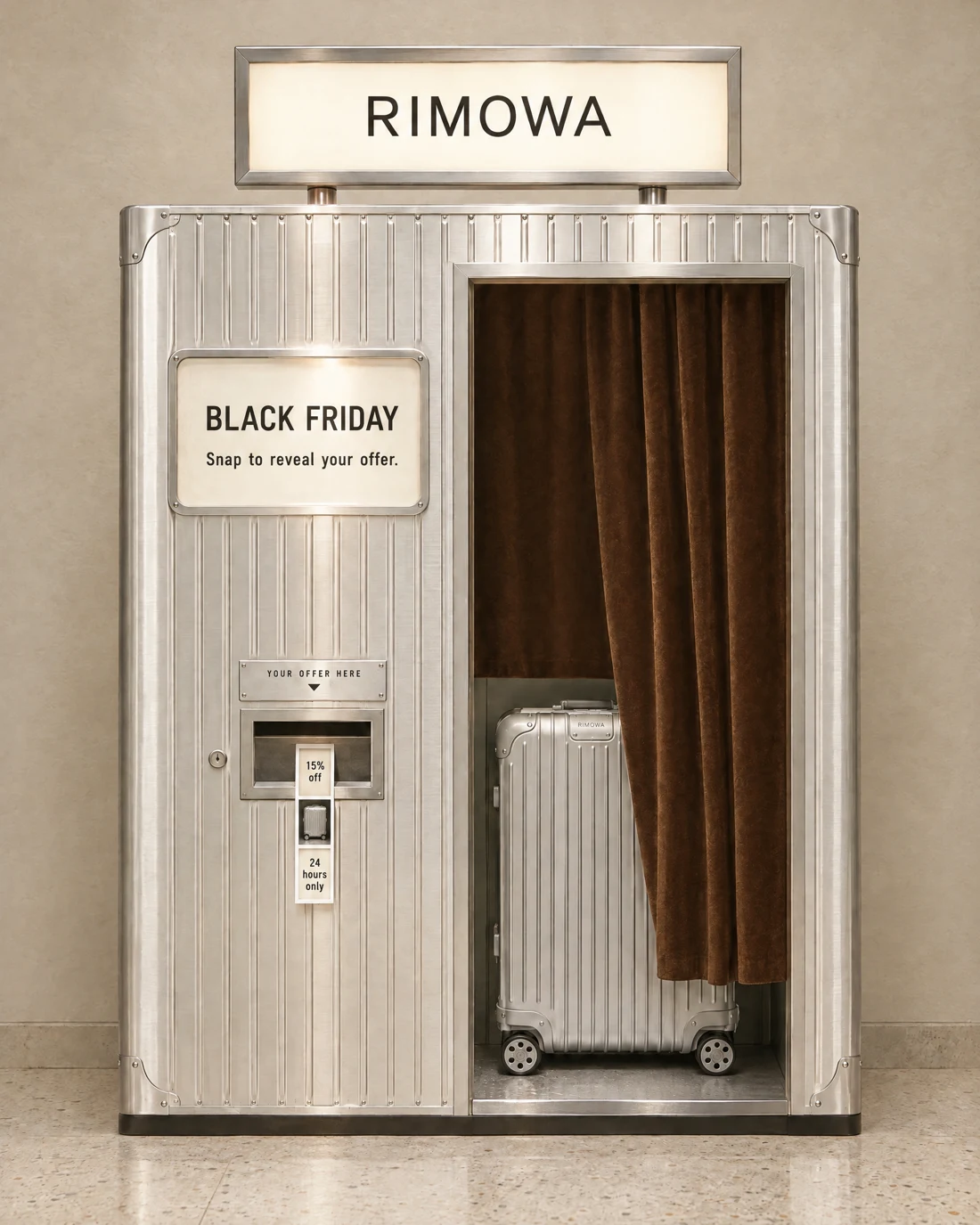
The first generation established the concept, but it did not say anything about the Black Friday promotion. I asked for another version with the campaign copy added.
The edit was deliberately limited: change the promotional copy and the photo-strip content. Preserve the booth, suitcase, materials, lighting, camera angle, and composition.
The left panel reads “Black Friday” and “Snap to reveal your offer.” The dispenser reads “Your offer here.” The strip carries “15% off” at the top, the suitcase in the middle, and “24 hours only” at the bottom.
When you request an edit, attach the approved image and state exactly what should change. Review the result for unintended changes before approving it.
Your photo booth prompts.
Photo booth: create the campaign still
Attach reference 1: product photo. Reference 2: vintage photo booth. Reference 3, if needed: material or color sample.
Create a photographic [BRAND] campaign image with [PRODUCT] as the focal point inside a vintage photo booth.

Preserve the product’s exact silhouette and proportions from reference 1. Use reference 2 for the booth’s structure. Keep the product large enough to recognize, with [KEY PRODUCT FEATURES] visible through the booth opening.
Wrap the booth exterior in [SIGNATURE BRAND MATERIAL AND TEXTURE], with [SURFACE FINISH] and [EXACT COLOR]. Apply this material to the booth only; preserve the product’s own finish and color from reference 1.

Place “[CAMPAIGN NAME]” and “[SHORT INVITATION]” on the upper-left booth panel. Label the photo-strip dispenser “[SHORT DISPENSER LABEL]”. Its strip has three squares: “[OFFER]” at the top, a faithful image of the product in the middle, and “[TIME LIMIT]” at the bottom. Keep the lettering readable.

Setting: [ONE-LINE BACKGROUND].
Lighting: [DIRECTION, SOFTNESS, AND COLOR TEMPERATURE].
Camera: [ANGLE], [LENS], [ASPECT RATIO], with the product and offer in focus.
Style: [THREE TO FIVE MOOD WORDS].
Photo booth: change only the promotional copy
Attach the approved photo booth image as the edit reference.
Change only the promotional lettering and photo-strip content in this approved image.

Preserve the product, booth structure, materials, colors, camera angle, framing, composition, scale, position, and lighting direction.

On the upper-left panel, write exactly “[CAMPAIGN NAME]” and “[SHORT INVITATION]”.
Replace the dispenser label with “[SHORT DISPENSER LABEL]”.
On the photo strip, the top square says “[OFFER]”, the middle square shows the same product with its original proportions, and the bottom square says “[TIME LIMIT]”.

Fit the copy within the existing panels and strip. These are the only requested changes.
Let an old printer reveal the campaign.
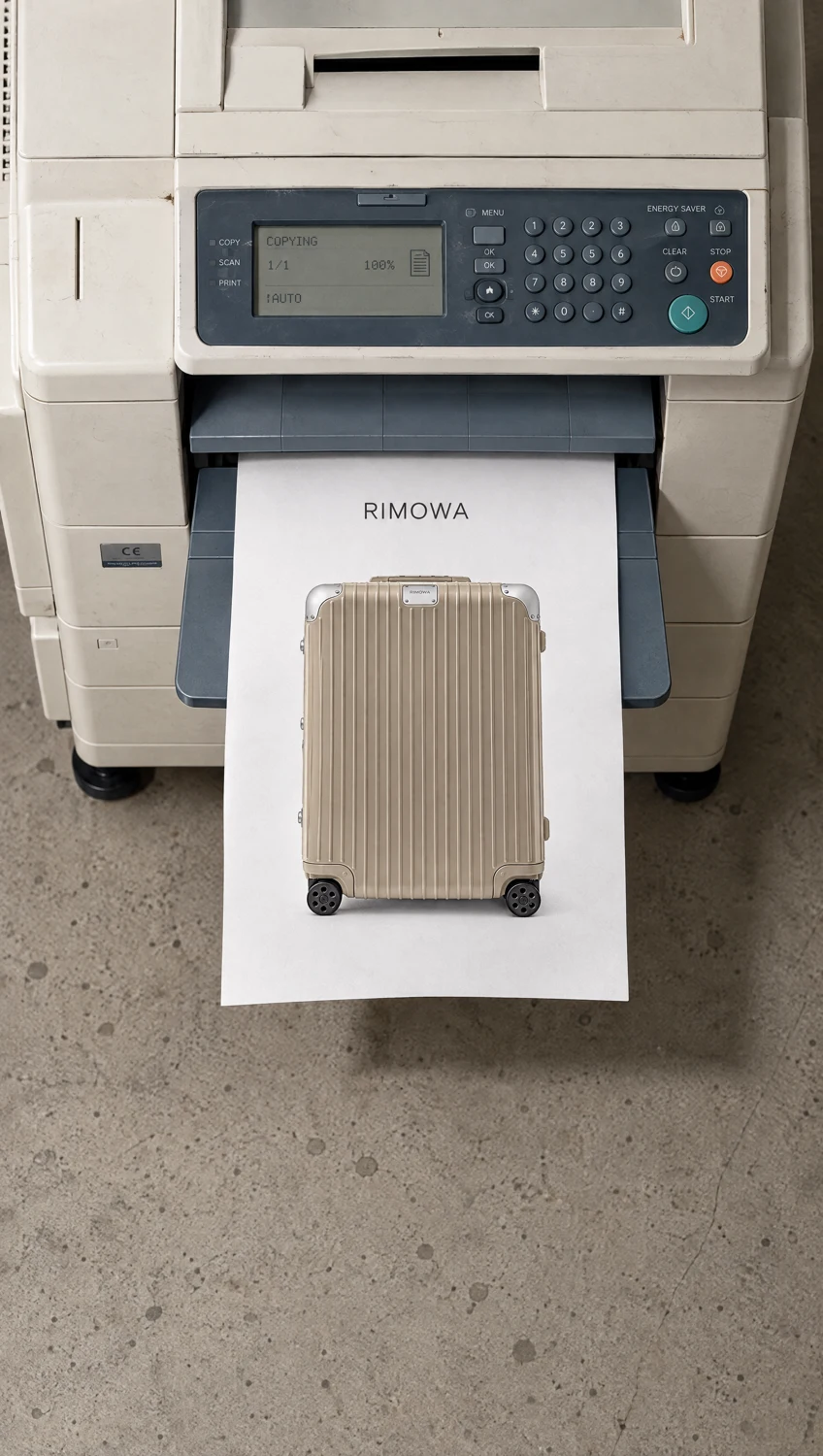
For the second concept, I used a ’90s-style printer to reveal the campaign on paper: first the RIMOWA suitcase, then “Black Friday,” then “15% off, 24 hours only.”
It turns a familiar office action into an unexpected product reveal. The offer becomes part of the scene.
Approve the stills before you make the video.
I generated the still images first so I could check the printer’s position, the product, the text, and how the papers overlap. The printer and camera angle needed to stay consistent across all three.
Check the product carefully. A sheet can cover part of the suitcase photo, but the suitcase underneath must retain its original proportions. Overlap is fine. A shortened or distorted product is not.
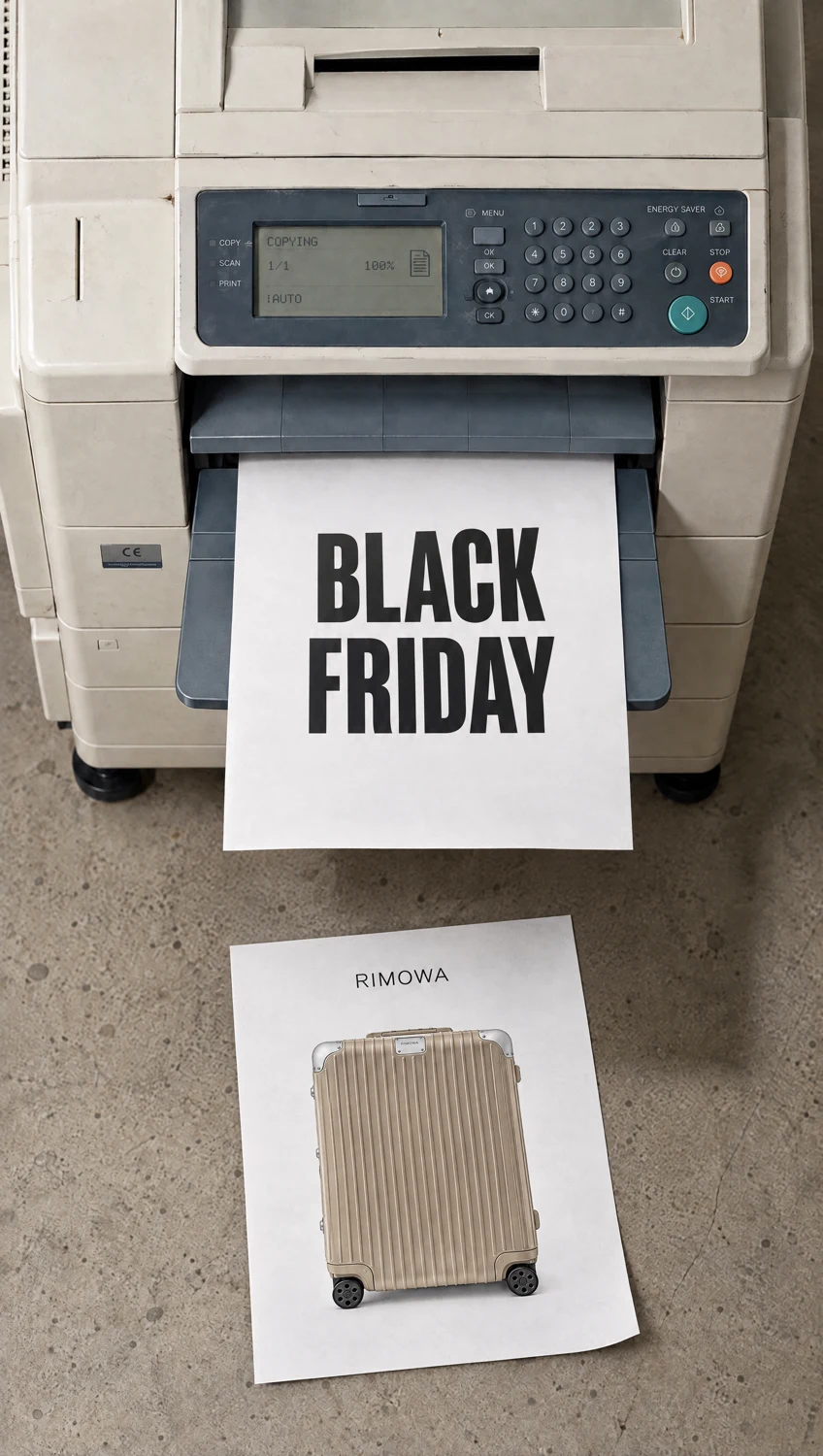
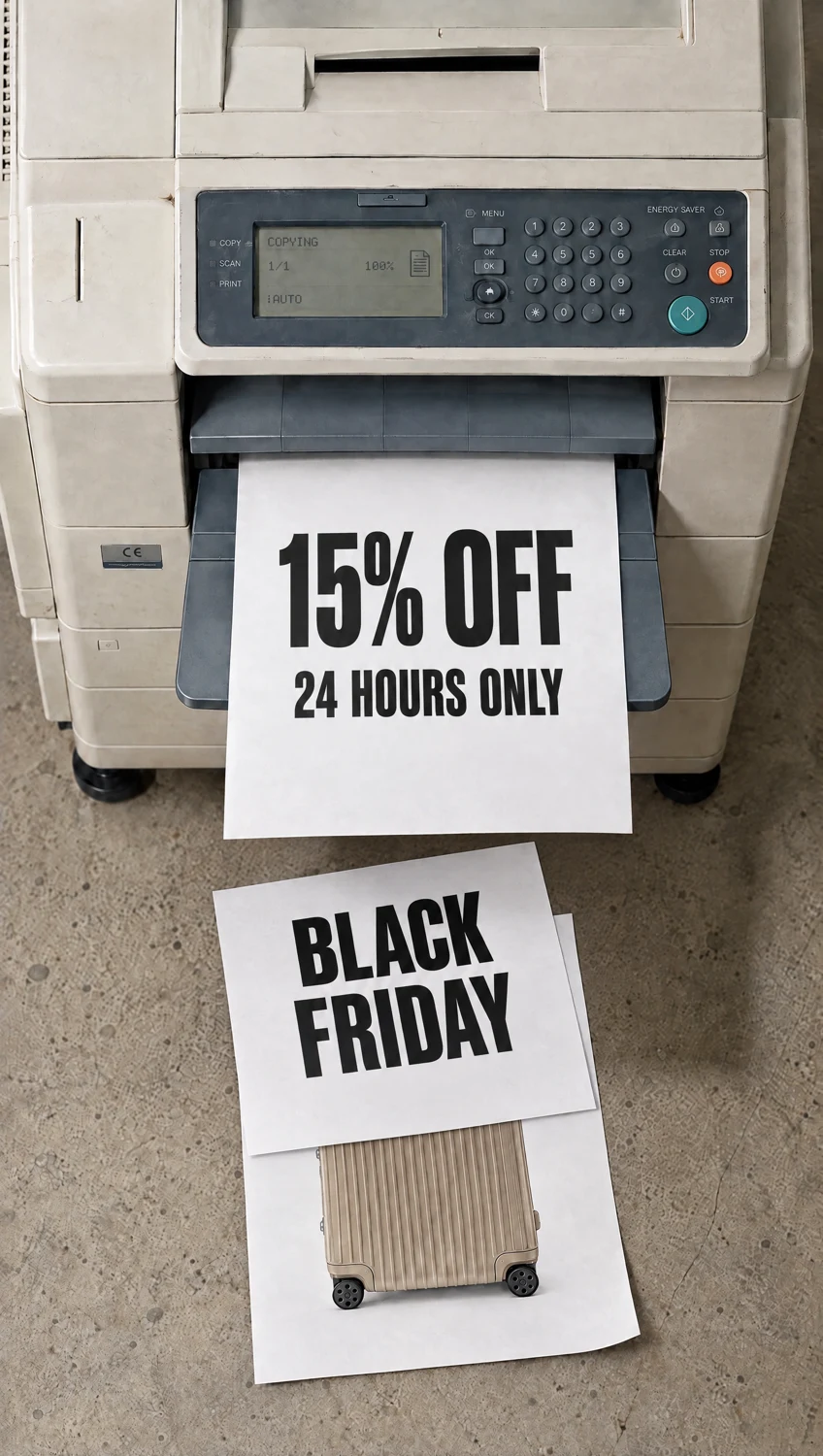
Give the movement its own direction.
Once the stills are approved, ask for the video on Higgsfield or your preferred video platform. Use the approved frames as references where the model supports them.
For this clip, I asked for a fixed camera, paper feeding out of the printer, and sheets drifting lightly onto the floor with natural weight and movement. The sound direction was the normal mechanical sound of a copier.
Keep the action simple enough for six seconds. Watch the finished clip before approving it: check the product, the text, the paper movement, and the sound. Approved stills give you a stronger starting point, but the motion still needs its own review.
Your printer prompts.
Generate and approve one still at a time. Use the approved image as the reference for the next.
Printer still 1: introduce the product
Attach reference 1: product photo. Reference 2: vintage printer.
Create a photographic campaign still for [BRAND], featuring a clear printed image of [PRODUCT] emerging from a 1990s printer.

Preserve the product’s silhouette, proportions, branding, and details from reference 1 within the printed photograph. Use reference 2 for the printer’s form and structure.
Printer material: [MATERIAL AND FINISH]. Printer color: [EXACT TONE]. Paper: uncoated off-white sheets with a subtle paper texture. Preserve the product’s reference colors in the print.

One sheet is partly released from the output tray, with the full product photograph already visible on its exposed portion. Size the product photograph to fit the sheet without stretching or cropping it. The product photograph is the main visual focus.
Setting: printer on [FLOOR SURFACE], with clear space in front for falling papers.
Lighting: [ONE CLEAR LIGHTING SETUP].
Camera: fixed high downward angle, output tray and landing area both visible, [ASPECT RATIO]. Keep the product photograph readable at this angle.
Style: [THREE TO FIVE MOOD WORDS].
Printer still 2: reveal the occasion
Attach approved still 1 as the scene reference and your original product photo for accuracy.
Advance this approved printer scene by one sheet.

Preserve the printer’s position, form, scale, color, lighting, camera angle, framing, floor, and paper size. Keep the product photograph faithful to its reference.

The first sheet, containing the product photograph, now rests naturally on the floor in front of the output tray. A second sheet is partly released from the same tray and reads exactly “[CAMPAIGN NAME]” in large [TYPE STYLE] lettering. Keep the product photograph visible and recognizable.

Change only the paper positions and the new sheet’s content. Maintain the same image dimensions.
Printer still 3: reveal the offer
Attach approved still 2 as the scene reference and your original product photo for accuracy.
Advance this approved printer scene by one more sheet.

Preserve the printer’s position, structure, scale, color, lighting, camera angle, framing, floor, paper size, and the product photograph’s original proportions.

The first product sheet remains on the floor. The second sheet, reading “[CAMPAIGN NAME]”, has landed partly over it. Keep a recognizable portion of the product visible. The overlap may hide part of the product image; do not shorten, compress, or redraw the product to fit the uncovered space.

A third sheet is partly released from the output tray. Its exposed area reads exactly “[OFFER]” and “[TIME LIMIT]” in large [TYPE STYLE] lettering.

Change only the paper positions and the new sheet’s content. Maintain the same image dimensions.
Printer video: animate the approved sequence
Use the approved stills as references where your video model supports them. If it supports only a start and end frame, use stills 1 and 3 and describe the middle action in the prompt.
Create a six-second photographic [BRAND] campaign video based on the approved printer stills. Format: [ASPECT RATIO].

Keep the camera fixed. Preserve the printer, floor, lighting, product design, sheet sizes, and framing throughout. The product photograph and campaign copy remain stable as each sheet moves.

0–2 seconds: the product sheet continues feeding from the output tray. Once released, it bends gently, flutters lightly, and settles onto the floor under gravity.
2–4 seconds: a second sheet reading exactly “[CAMPAIGN NAME]” feeds out, releases, and drifts onto the first sheet. Keep the product recognizable beneath the overlap.
4–6 seconds: the third sheet feeds out with “[OFFER]” and “[TIME LIMIT]” visible. End with this sheet still partly in the output tray, matching the approved final still and holding the offer long enough to read.

Each page exits through the same output slot. Paper motion is light and physically plausible, with contact shadows where sheets overlap.
Sound: natural copier motor, rollers, paper feed, and soft paper rustle, synchronized with the action. No music or voice-over.

Style: tactile, nostalgic, understated, photographic.
Your pre-generation checklist.
Start with one product, one unexpected setting, and one clear offer. Use these checks before committing credits to the next generation.
Choose an analog object that fits your brand’s world. Give it a role in revealing your product or offer. Then use AI to build the idea one approved image at a time.