7 BFCM Visual Ideas Beyond the Red-and-Black Sale Ad
Choose a visual direction, find Pinterest references and brief ChatGPT or Claude before generating your BFCM assets.
By Anne Reyes · The Chic Strategist · October 20, 2026
Choose your visual direction
Borrow the technique. Make it your brand.
These are visual descriptions of the references, not claims about how the originals were made. Search the phrases below on Pinterest, then choose one image for composition and one for lighting. Keep your own product as the product reference.
Visual reference 01
01 / Everyday luxury / candid vanity editorial
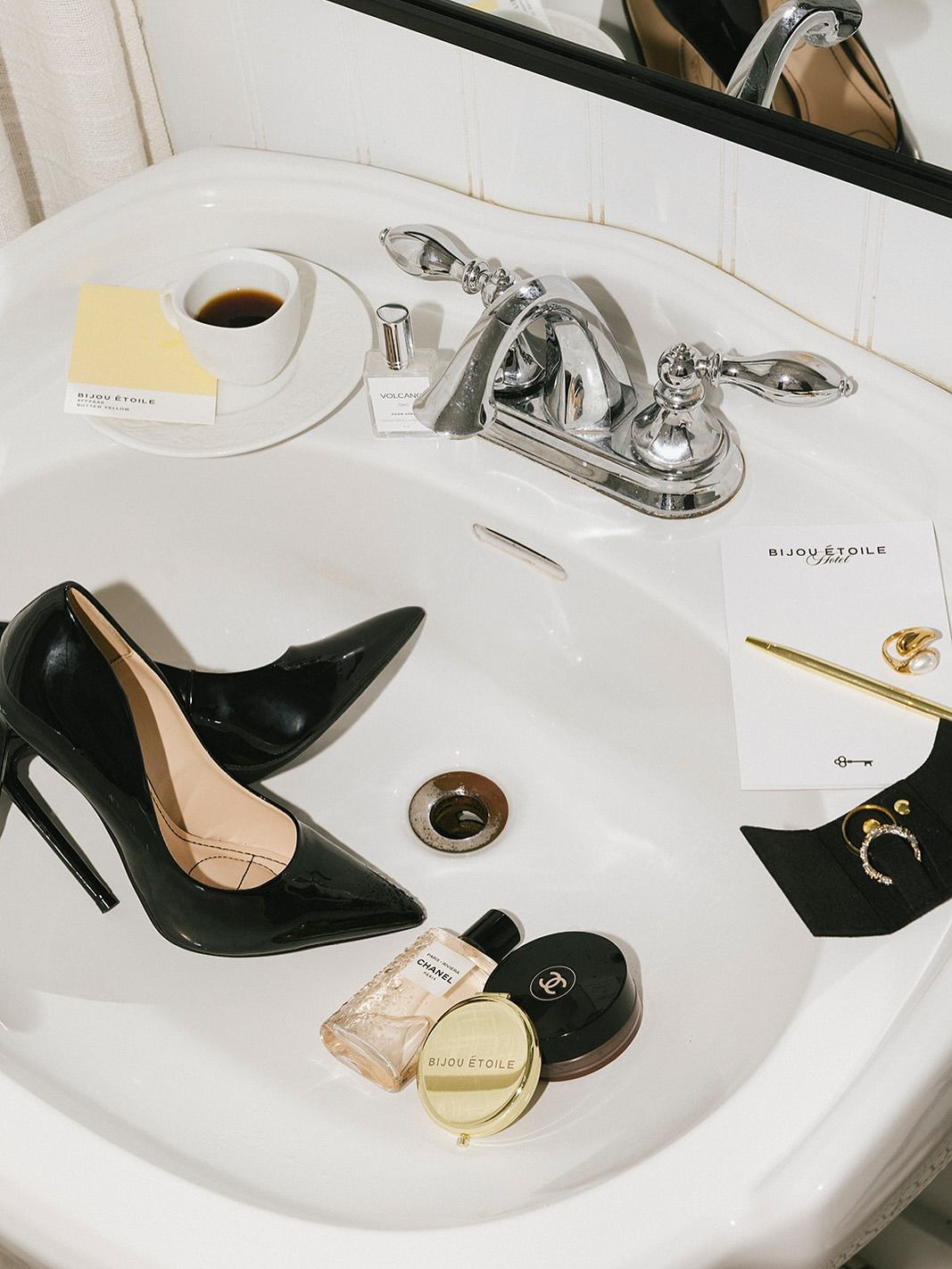
Bathroom still life
A sink becomes a styling surface. Shoes, cosmetics and personal objects make the scene feel like a moment in someone’s day, with an unexpected product placement.
BFCM angle: Use it for a getting-ready edit, a wish list or a small selection of gifts.
Prompting tipName the hero product and limit the supporting objects. Describe the exact location of each item so the product does not disappear into clutter.
Ask ChatGPT or Claude to adapt this style
Customize the brackets
Develop a BFCM image prompt for [PRODUCT] as the hero in a bathroom still life. Use my reference for the sink composition and light only. Keep my real product shape and material. Include only [TWO SUPPORTING OBJECTS], positioned [PLACEMENTS]. Keep the sink dry, with believable contact shadows. Use [BRAND PALETTE] and leave [AREA] clear for sale copy. Show me the prompt first. Do not generate.
Visual reference 02
02 / Laboratory-inspired product still life
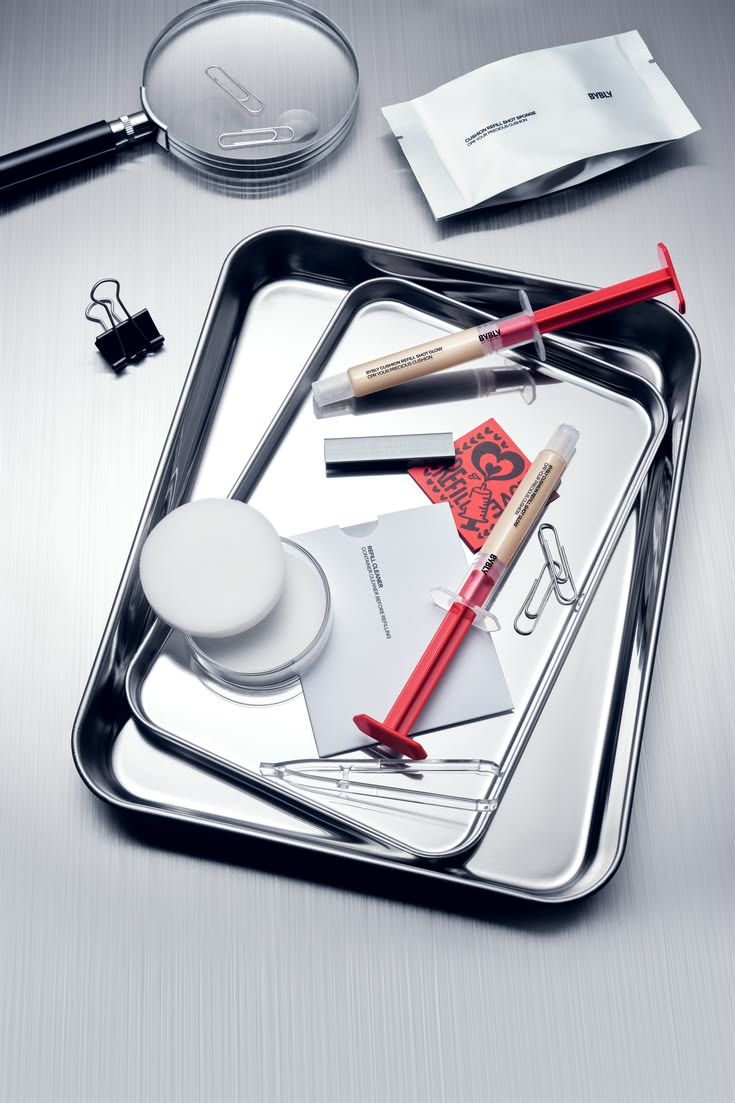
Clinical chrome
Reflective steel trays, precise placement and cool light give the product a crisp, technical setting. One accent color can provide contrast.
BFCM angle: Use it for a curated essentials edit or a close look at product details.
Prompting tipUse the visual language of precision without inventing a scientific claim. Keep the actual packaging; do not turn it into a syringe or medical device.
Ask ChatGPT or Claude to adapt this style
Customize the brackets
Write a BFCM image prompt for [PRODUCT] on a reflective stainless-steel tray. Preserve the actual packaging and label. Use the inspiration only for the tray, cool directional light and composition. Add [ONE RELEVANT PROP] and one accent in [BRAND COLOR]. Keep the product front readable and reflections physically consistent. Do not invent clinical claims or medical packaging. Show the prompt only; do not generate.
Visual reference 03
03 / Product contact sheets / print collage
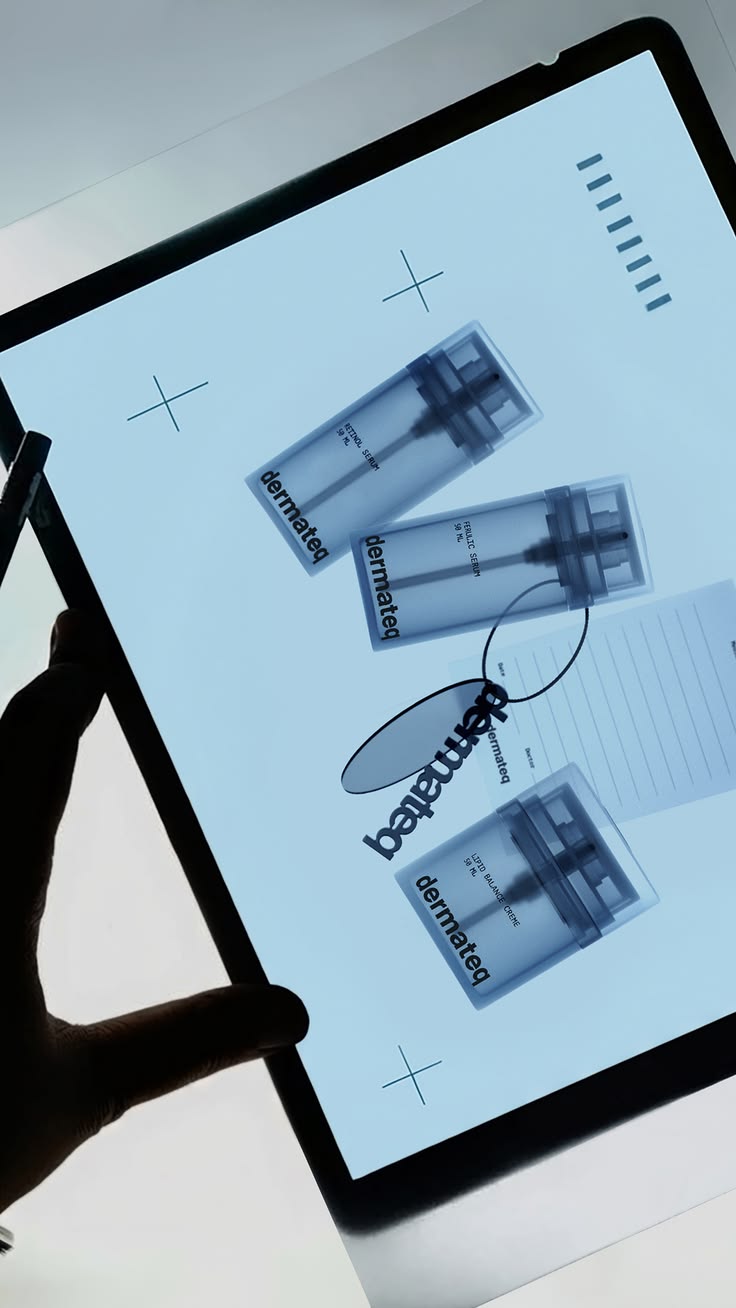
The editorial light table
Overlapping product photographs, a translucent light table and hands create the feeling of an art director reviewing a campaign. Cool light and repeated crops give it structure.
BFCM angle: Use it for a collection preview or a close-up story about one hero product.
Prompting tipDefine what is a printed photograph and what is a real object. Ask for the same product on every print, with exact hand positions if hands are included.
Ask ChatGPT or Claude to adapt this style
Customize the brackets
Write a BFCM prompt showing printed photographs of [PRODUCT] arranged on a softly glowing light table. Every print shows the same supplied product from [APPROVED VIEWS]. Keep all products inside the photographs; there is no physical product on the table. Include [NUMBER] hands touching only the print edges with natural fingers. Use [COLOR TONE]. Reserve [AREA] for the offer. Show the prompt first; do not generate.
Visual reference 04
04 / Translucent textile / silhouette still life
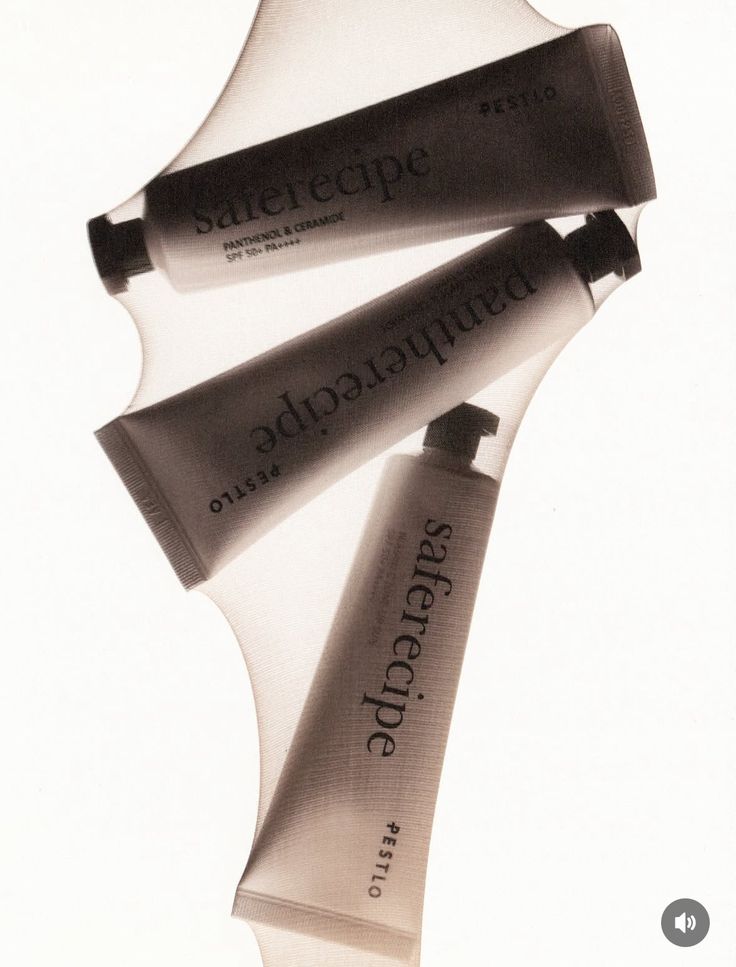
Backlit sheer fabric
Products sit behind a fine translucent fabric. Backlighting reveals their outlines while the textile softens details and gives the image a tactile surface.
BFCM angle: Use it for a teaser or early-access reveal, then pair it with a clear product image.
Prompting tipSay that the fabric is translucent, not the product. Decide whether the label must be readable or whether the silhouette is enough for this teaser.
Ask ChatGPT or Claude to adapt this style
Customize the brackets
Write a teaser image prompt for [PRODUCT] behind fine translucent fabric in [COLOR]. Keep the product itself opaque and unchanged. Light from behind so its silhouette remains recognizable through the weave. Keep [IMPORTANT SHAPE DETAIL] visible. Use [NUMBER] products with defined spacing. This is a teaser; do not promise readable small label text through the fabric. Show me the prompt without generating.
Visual reference 05
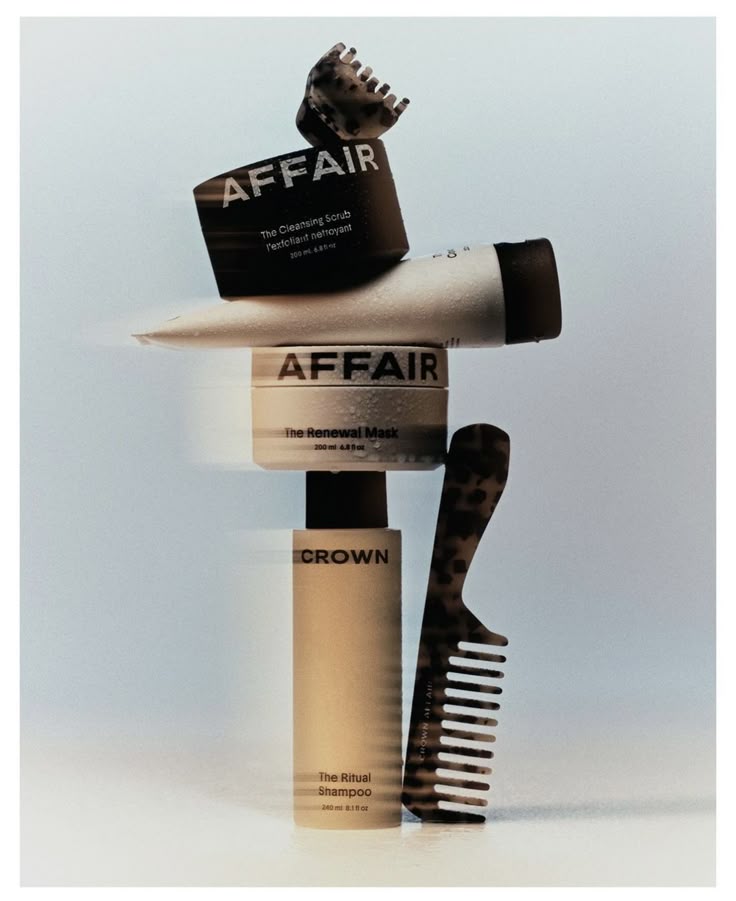
05 / Product balancing / still-life tower
Sculptural stacking
Products and a few everyday props form a vertical sculpture. The changing angles create tension while a quiet background keeps the stack readable.
BFCM angle: Use it for a bundle, a complete routine or a gift edit with several products.
Prompting tipGive the bottom-to-top order and the number of products. Specify contact points and realistic relative sizes so the model does not invent duplicates or floating layers.
Ask ChatGPT or Claude to adapt this style
Customize the brackets
Write a BFCM image prompt for a sculptural stack of [EXACT PRODUCTS]. From bottom to top: [ORDER]. Keep their true relative sizes, original packaging and separate outlines. Every item has a visible support point and contact shadow. Add only [PROP, OR NONE]. Use [BACKGROUND COLOR] and [LIGHTING]. Keep the composition stable and the hero product recognizable. Show the prompt first; do not generate.
Visual reference 06
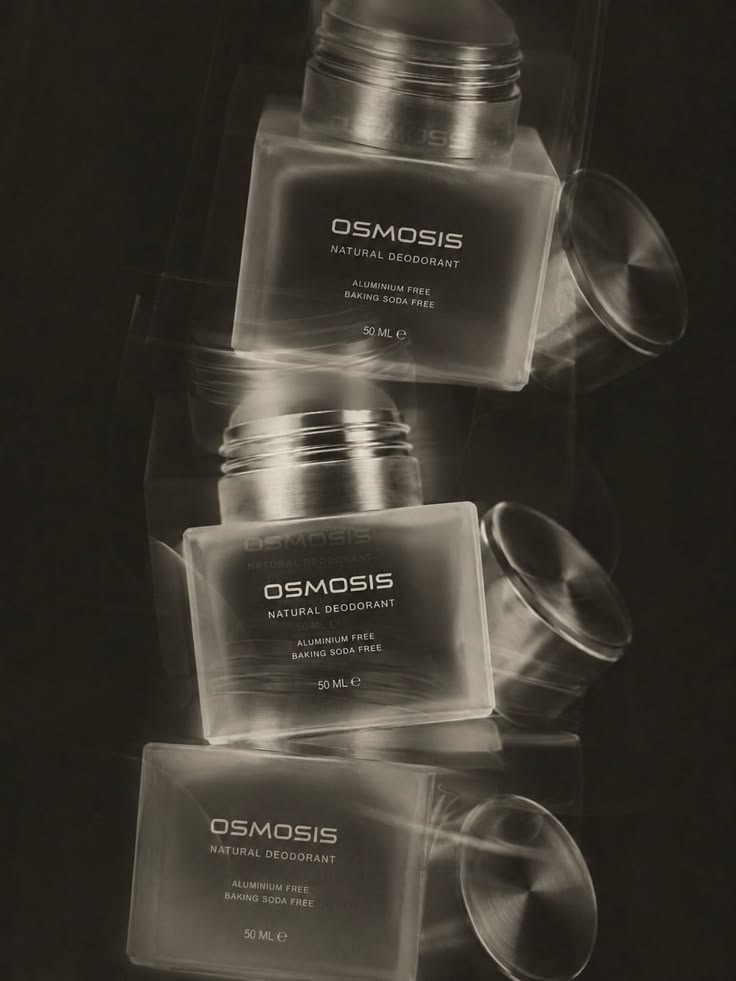
06 / Long-exposure-inspired product photography
Motion blur and ghosted edges
Repeated edges and soft trails imply movement in a still image. Dark surroundings and bright reflections give the glass and metal a luminous quality.
BFCM angle: Use it for a launch mood or an energetic campaign image, paired with a clear product view.
Prompting tipKeep one main product sharp. Tell the model where the blur belongs so it does not smear the label or change the number of actual products.
Ask ChatGPT or Claude to adapt this style
Customize the brackets
Write a still-image prompt for [PRODUCT] with a long-exposure-inspired effect. Keep one main product and its label sharp. Add subtle ghosted trails only around [EDGES OR BACKGROUND], traveling [DIRECTION]. The trails are an optical effect, not extra products. Preserve the cap, shape and color. Use [PALETTE] with [LIGHTING]. Show the prompt without generating.
Visual reference 07
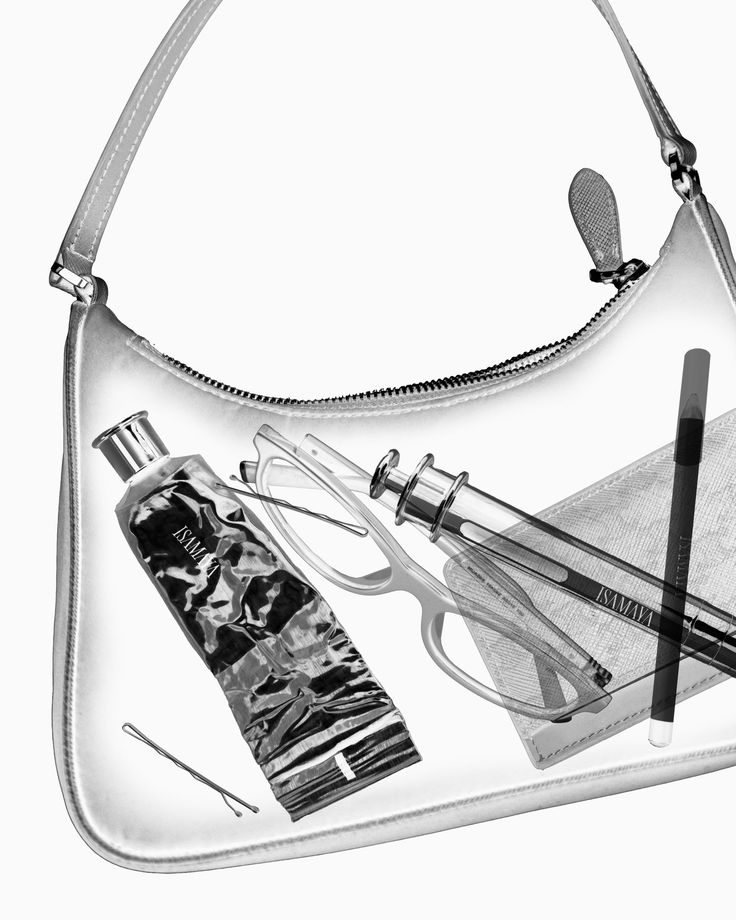
07 / Radiographic-inspired / see-through still life
X-ray transparency
A familiar bag becomes transparent, revealing the objects inside. Monochrome edges, layered shapes and visible hardware create an unexpected view.
BFCM angle: Use it for a what’s-inside story, an essentials edit or a bundle reveal.
Prompting tipSeparate the transparent container from the contents. List exactly what should be visible and where it sits. Treat the effect as stylized art, not proof of internal construction.
Ask ChatGPT or Claude to adapt this style
Customize the brackets
Write an X-ray-inspired campaign image prompt for [CONTAINER PRODUCT] containing [EXACT ITEMS]. Preserve the container silhouette, seams and hardware. Render only the outer shell translucent so the contents show through. Arrange the contents naturally at [POSITIONS] with overlap, not an upright showroom row. Use a monochrome radiographic-inspired look. This is stylized artwork, not a literal scan. Show the prompt first; do not generate.
Spend on the idea you actually want
Get the brief right before generating.
Use ChatGPT or Claude to turn your product and references into a clear brief, then generate in Higgsfield. These steps can reduce avoidable revisions; they cannot guarantee a perfect first result or zero wasted credits.
1. Choose the job of the image.
Decide whether this is a teaser, a product ad or a bundle image. A silhouette can work for a teaser; an ad asking someone to buy needs a recognizable product and a clear offer. Keep the discount, deadline and conditions legible even when the visual is unusual.
Start with the brief
Help me plan one BFCM image for [PRODUCT]. Its job is [TEASER / PRODUCT AD / BUNDLE]. The offer is [EXACT OFFER AND CONDITIONS]. My visual direction is [STYLE] and my brand palette is [COLORS]. I have supplied the real product and inspiration images. Tell me what you can verify, what is missing and any conflicting instructions. Do not invent product details. Do not generate anything yet.
2. Give each reference one job.
Identify the product reference, the style reference and any pose reference. If you want an existing setting kept, name it as the base image. Saying “inspired by this” gives the model more freedom than asking for a specific edit.
Separate the references
Reference 1 is my product: preserve its shape, proportions, material and color. Reference 2 is for [COMPOSITION / LIGHTING / COLOR] only; do not copy its product or branding. Reference 3, if supplied, is for [POSE / WARDROBE] only. The exact details that must remain are [DETAILS]. Explain how you will use each reference, then write one prompt. Do not generate until I approve it.
3. Review one prompt, then one image.
Read the proposed scene before approving a render. Check the crop, product size, object count, hand placement and exact text. Resolve contradictions such as “keep the original room” and “change the camera angle.” Ask for one image before a batch, and ask for the current credit cost before approving generation.
Check before spending
Review this prompt for contradictions, unclear reference roles, product inaccuracies and difficult text or hand placement. Simplify anything that does not support the idea. Show me the revised prompt and explain any change. Do not generate. After I approve it, confirm the current generation cost and make only one image.
Keep sale copy controllable.For an offer that must be exact, reserve a clear area and add the final headline, price and deadline in your design tool. This avoids regenerating the whole image over one letter or number.
4. Correct one thing. Lock the rest.
Use the closest approved image as the base for an edit. Name the visible problem and the precise change. Compare the result with both the base image and the real product. If the same problem persists, revise the reference or simplify the scene before paying for another attempt.
Make a targeted revision
Use this approved image as the base. Change only [ONE SPECIFIC DETAIL]. Keep the product, composition, camera angle, crop, lighting, colors, background and all other objects unchanged. Do not reinterpret the whole scene. Tell me if this change conflicts with anything I asked you to preserve. Show the edit prompt before generating.
5. Approve the still before adding motion.
Make sure the starting image already has the right pose, crop and object positions. Start with one simple movement. Describe what moves, what stays still and what causes the action. Exact letter-by-letter typing is better handled as a controlled text animation than left to a video model. Upscale only after the composition is approved.
Plan a simple animation
Use this approved image as the exact start frame. The camera stays locked. Only [OBJECT] moves, [DIRECTION AND SMALL AMOUNT], over [DURATION]. Everything else stays still. Preserve the product, printed artwork, logo and lighting. Sound: [REALISTIC SOUNDS, OR NONE]. Identify any motion or text that would be more reliable as an edit instead of a generated effect. Show the plan and prompt first; do not generate.
These copyable prompts request planning or revisions from ChatGPT or Claude. They do not trigger a render by themselves. Chat and generation charges depend on your accounts and the tools you choose.
Brand & AI strategist · Founder, Brandworks Studios
17 years building brands, and I scaled my marketing agency to 7 figures within 2 years, with clients including Amazon, Pier 1, and Dressbarn. I now build AI marketing systems for e-commerce brands through BAIBE, the Brandworks AI Brand Engine. AI does the production. Taste directs it.
Keep going
Want the next build?
The Chic Strategist breaks down a new AI marketing system every week. Or bring your brand to a strategy call and we'll build it together.