Writing the email is not the hard part. You can get words on a page in ten minutes.
The part that stalls is everything after: making it look like your brand rather than like the template it was built in. Most AI-written emails fail on the same two things. The colors are approximately right, and the copy would fit any brand in your category.
This fixes both. Five prompts, one build, and a finished email you can send.
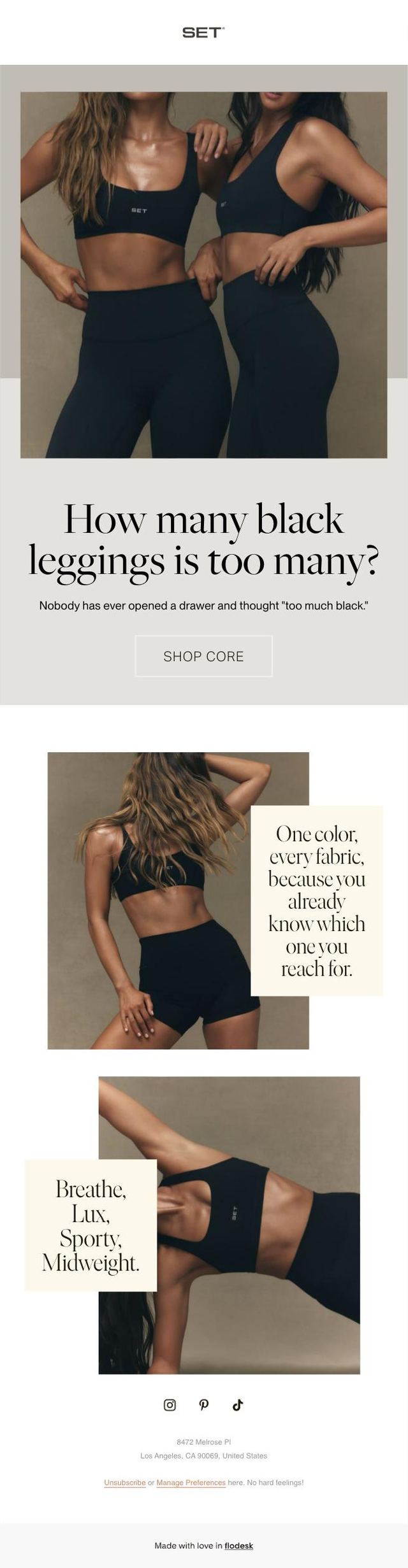
The finished thingScroll inside the frame. Built in Flodesk from the prompts below, for a brand I do not work for.
The whole thing on one page
| Step | What you do | How long |
|---|---|---|
| 1 | Load your brand into your email platform. Brand kit if you have one, live-site colors if you do not | 10 min, once |
| 2 | Show AI the photos going in the email, before you ask for a single word | 2 min |
| 3 | Define the voice as a ban list | 5 min, once |
| 4 | Write the brief, then the copy, with your brand files loaded | 10 min |
| 5 | Build it in your email platform | 20 min per email |
Steps 1 and 3 are setup. You do them once per brand and never again. Steps 2, 4 and 5 are the twenty minutes you spend per email after that.
What you need before you start
- Claude, with your brand folder available to it. Not a fresh chat window. A session that can read the files that describe your brand. This is the single biggest difference between copy you can send and copy you have to rewrite, and step 4 covers exactly what goes in that folder.
- Your email platform. I use Flodesk, so the build instructions name Flodesk. Klaviyo, Mailchimp and Beehiiv all have the same two things this relies on, a brand settings panel and a block editor, so the order still holds.
- The photos you are actually going to use. Not a mood board. The images that will sit in this specific email.
Step 1. Load your brand into your email platform Setup
Do this before you place a single block. Every layout decision after it inherits from here.
If you have a brand kit, upload it
Most email platforms have a brand settings panel that holds all of it. In Flodesk it is under Brand settings. Put in everything you have:
- Your logo, in the file formats you actually own, ideally SVG or transparent PNG
- Your typography, the heading font and the body font
- Your colors, all of them, with the primary text color set as the default
- Your button style, your link color, your footer text
That is the whole step. Skip to step 2.
If you do not know your colors, read them off your own site
Plenty of brands do not have a kit, or have one that no longer matches the site. Do not eyeball the colors from a screenshot. Your site already contains its exact palette in the code, and AI can read it.
Then put those six into your platform's brand settings, and set the primary text color as your default before you build anything.
Run against setactive.co on August 5, 2026, that prompt returned six colors. The one that mattered was the first.
SET never uses black for body copy. They use #201605, a brown so dark it reads as black, and it appears hundreds of times on the homepage. Swapping true black for that one value is the difference between a generic template and something that reads as theirs. Pairing it with the warm cream #F9F7F3 is the signature combination.
Your brand has an equivalent. It is almost never the color you would have guessed.
Step 2. Show the photos before you ask for a word
A collection name is not a brief. The images are the brief.
Ask for copy based on a collection name and you get copy about what that name sounds like. Upload the actual photos going in the email and you get copy about what is in them, which is a different email.
That last line is the one worth keeping. Copy should agree with the photos, not translate them. If the image is doing the work, the copy gets to be shorter, and shorter is where the personality lives.
Four emails, four sets of photos, four different answers. The all-black set read as restraint and repetition, so the copy got dry and short. The color drop read as rollerblades, contrast piping and butter yellow, so the copy got loud. The off-duty set read as street, movement and a duffel bag, so the copy got a verb in it.
Same brand, same voice, four different rhythms. That only happens if the photos go in first.
Step 3. Set the voice as a ban list Setup
Positive voice instructions produce mush. "Warm, confident, playful" describes every brand that has ever written a brand book, so it steers nothing.
The bans are what make it specific. "Never says crush your goals" describes one brand.
Keep the answer. Paste it into every copy prompt from here on, and save it into your brand folder as a never list so you stop pasting it by hand.
Five bans carried the whole voice:
- No body-transformation or weight-loss language
- No "crush your goals" or "sweat in style" activewear clichés
- No emojis, no stacked exclamation marks
- No manufactured scarcity
- No discount language on a full-price drop
Notice what is not banned: warmth. SET's voice is casual and friendly, so banning warmth would have broken it. A ban list is specific to the brand, not a list of things good copy never does.
Step 4. Write the brief, then the copy
This is the step where most people lose the brand, and it is not because of the prompt. It is because of what the AI could see when it read the prompt.
First, give it your brand files
Before you ask for a single line, point Claude at the folder that holds your brand. Not pasted into the chat. Loaded, so it can read the files itself and keep reading them all session.
That folder should hold five things:
- Your brand context file. What you sell, who buys it, how you talk, what you stand for.
- Your brand kit. Logo files, fonts, the palette from step 1.
- Your product data. Real product names, real fabrics or ingredients, real categories. This is what stops the AI writing about a product you do not sell.
- Your past campaigns. The emails that performed, so it can hear the rhythm rather than being told about it.
- Your never list. The output of step 3.
Then ask for the brief, not the copy
Asking for copy first gets you copy. Asking for the brief first gets you a reason for the copy, and that is what makes it sound like a decision rather than a draft.
Why point 4 is worded that way. Without "for THIS customer specifically, not for DTC in general," you get three concepts that would work for any brand with an email list. Naming the failure mode inside the prompt is what prevents it.
Then the copy, with the invention clause
That last paragraph is not optional. It is the difference between copy you can ship and copy you have to fact-check line by line. An AI that cannot invent a price also cannot embarrass you in front of a client.
For the all-black core collection, what came back was this:
How many black leggings is too many?
Wrong question.
Breathe, Lux, Sporty, Midweight. Leggings, straight legs, shorts, sweats, and a zip-up that goes over all of it. One color, every fabric, because you already know which one you reach for.
Nobody has ever opened a drawer and thought "too much black."
Four seconds to read. Specific enough that it could only be this brand, because the fabric names came out of the product data in the folder rather than out of the model's imagination.
Step 5. Build it
Four rules, in this order.
- Brand settings first. The six colors from step 1, loaded before you open a layout.
- Set the primary text color as your default before you place a single block. Otherwise you will be correcting the text color on every block you add, and you will miss one.
- Build the shortest email in the set first. It establishes the button style, the spacing and the header treatment that the rest inherit. Building the longest one first means redoing it.
- Alternate white and section-background blocks so the layout has rhythm without introducing a second color.
Optional. Export the design as an image Optional
Only worth doing if you want the email as a flat image, for a portfolio, a social post or a deck. Skip it if you are just sending the email.
Flodesk has no download button, so the route is the preview link:
- Hover the email card in your Emails dashboard, click the three dots, choose Get preview link.
- Open that link in Chrome.
- Open DevTools, press Cmd + Shift + P, type "Capture full size screenshot." That gives you one image of the entire scroll.
- Or press Cmd + P on the preview link and save as PDF.
If you want a video of it instead, screen-record the preview link rather than the editor. No sidebars, no interface, just the email scrolling.
The prompt chain, in order
Five prompts. Swap the brackets, run them in sequence, and the fifth one has everything the first four established.
| # | Prompt | What it gives you |
|---|---|---|
| 1 | Palette from your live site | Six exact hex codes. Skip if you have a brand kit |
| 2 | Read the photos | The mood the copy has to agree with |
| 3 | Ban list | Ten sentences your brand is not allowed to say |
| 4 | Campaign brief | Three concepts and a recommendation, no copy yet |
| 5 | The copy | Subject lines, preview text, headline, body |
The four finished emails
One brand, one palette, one ban list, four collections. Scroll inside each frame.
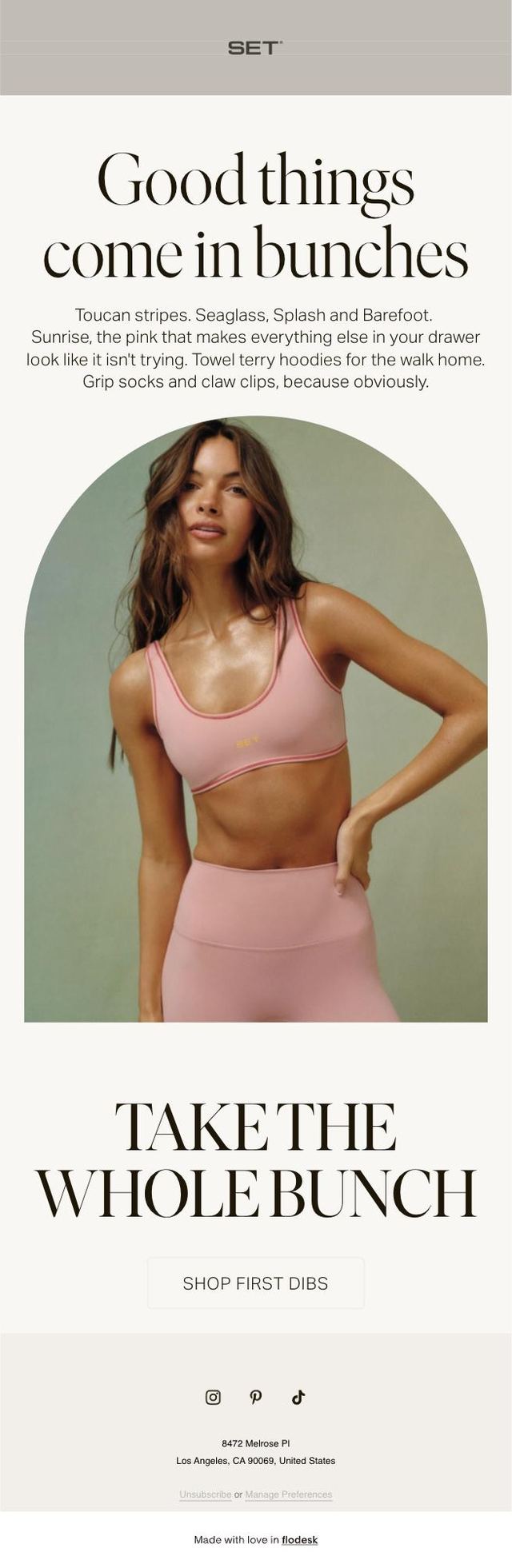

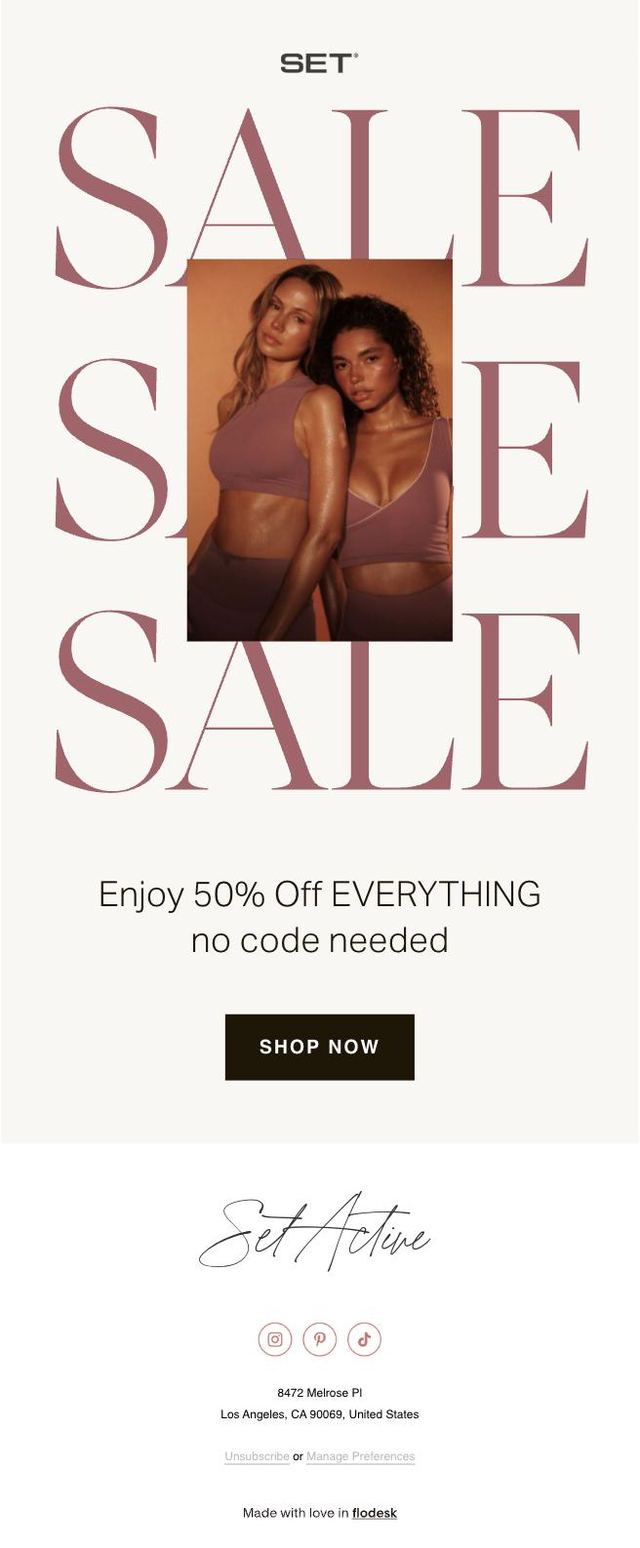
Concept work, not a client project. Every number is a placeholder.
Five things that made the difference
Read the CSS, do not guess the color. Ten seconds of work, and it is the single biggest visual upgrade available to an email.
The images are the brief. A collection name tells the AI what the collection is called. The photos tell it what the collection is.
Ban list over adjectives. "Warm and playful" describes every brand. "Never says crush your goals" describes one.
Force the brackets. An AI that cannot invent a price also cannot invent a review, a launch date or a sellout number, which is what makes the output safe to send.
One collection, one mood. Four emails from the same brand should not share a copy structure. A loud color drop and a quiet all-black run need different jokes, different rhythm, different lengths. If your four emails feel like one template, the AI is pattern-matching instead of reading.
The checklist
- Brand kit uploaded, or six hex codes pulled from the live site
- Primary text color set as the default before any block was placed
- Photos uploaded and read before any copy was requested
- Ban list written and saved into the brand folder
- Brand files loaded in the session, not pasted into the chat
- Brief approved before the copy was written
- Every unverifiable number still in brackets, or replaced with a real one
- Whole email scrolled top to bottom, no template placeholder text left
How do you find a brand's exact colors for an email?
Read the live CSS on the brand's own website instead of picking colors off a screenshot. Every site already carries its exact palette in the code, so you can ask an AI assistant to open the site, read the stylesheet, and return the hex codes for primary text, page background, section background, border, accent and muted text. If you already have a brand kit, skip this and upload the kit to your email platform instead.
Why does AI-written email copy sound generic?
Because it has nothing about your brand to work from, so it writes the average of every brand in your category. The fix is to give the AI your own files before you ask for a single line: your brand context file, your brand kit, your product data, your past campaigns and your never list. Copy written against those files sounds like you. Copy written against a collection name sounds like a template.
What files does AI need to write email copy in my brand voice?
Five: a brand context file that says what you sell and who buys it, a brand kit with your logo, fonts and colors, your product data with real names and fabrics, a folder of past campaigns that performed, and a never list of the phrases your brand is not allowed to say. Keep them in one folder and point the AI at that folder at the start of every session.
How long does it take to design an on-brand email with AI?
About twenty minutes per email once the setup is done. The setup, meaning the palette in your email platform, the ban list and your brand files in one folder, takes an afternoon and you only do it once. After that every new campaign starts from the files instead of from a blank page.
Should you design emails for a brand you do not work for?
It is the fastest portfolio piece available to a freelancer, because a finished on-brand email is a better introduction than a pitch. Two rules make it safe: label it clearly as an unpaid concept, and keep every unverifiable detail in brackets so you are never inventing a price, a review or a launch date on a brand's behalf.