The Post-Purchase Email That Sells the Second Order
Four steps and five prompts that turn your order confirmation into the email that sells again, exported as slices you upload straight into Klaviyo.
By Anne Reyes · · 7 min read
Higgsfield generates the two lifestyle images. Claude writes the offer, builds the layout, and cuts it into the slices your ESP wants.
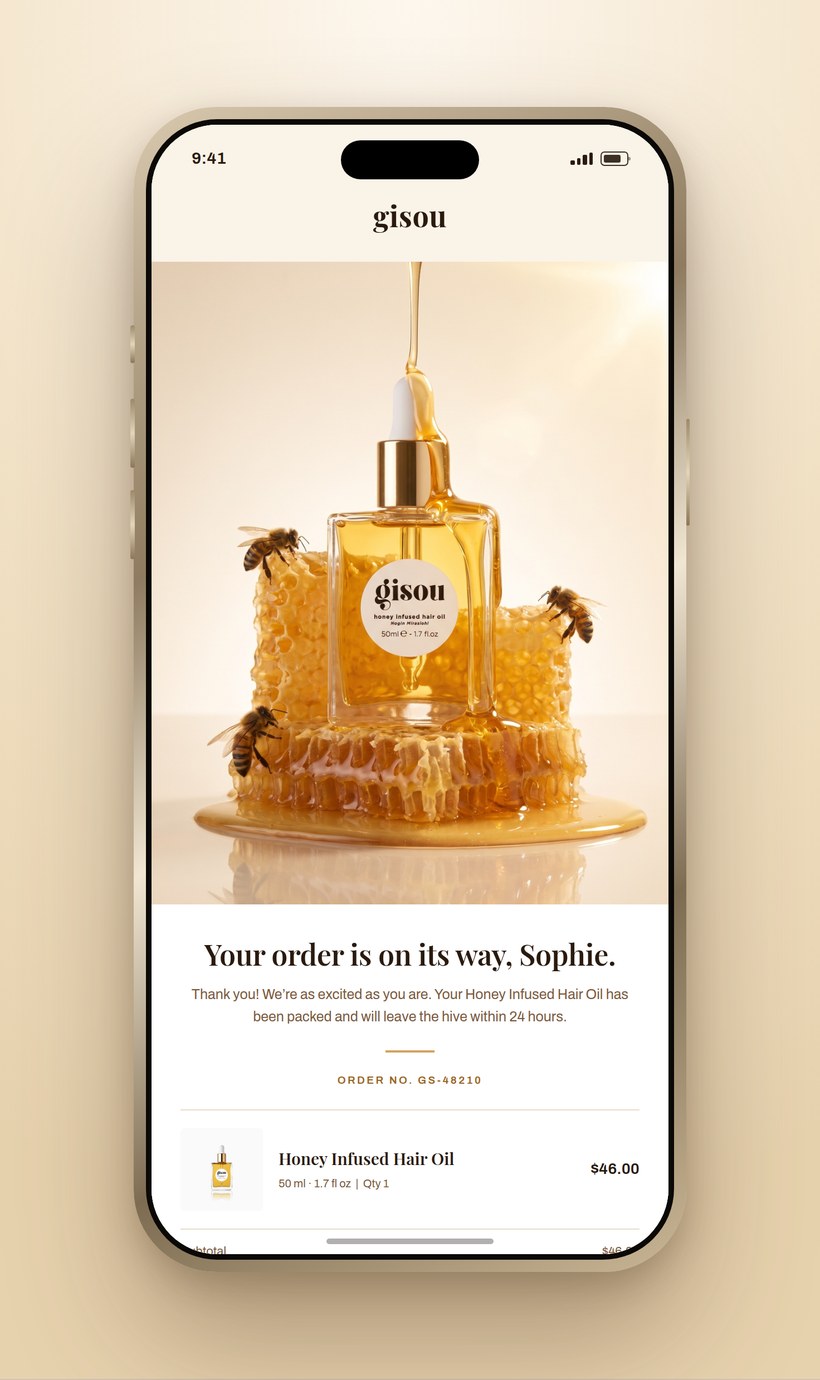
The buildA concept email for a haircare brand, made from two product photos and a catalog.
What do you need before you start?
Your catalog and one recent order. Whatever a customer just bought, and the list of everything else you sell. That is the whole input for the offer.
A packshot of both products. The one they bought and the one you will pair with it. Listing images are fine.
Your brand rules written down once. Palette, display font, body font, logo placement, and a list of what is banned. You will paste this into every prompt below.
What actually goes in a post-purchase email?
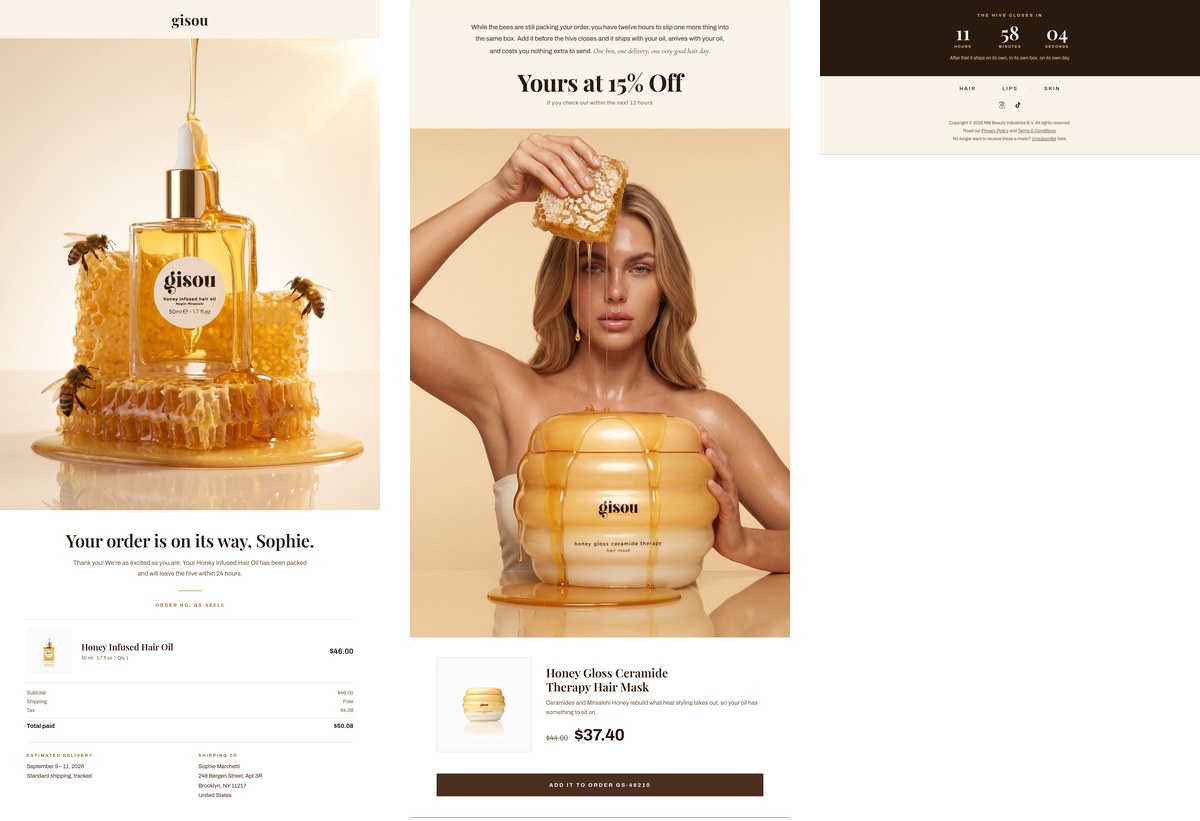
Four blocks, in this order, and the order is the whole thing. Order confirmation on top, because that is what they opened it for. The offer under it, while they are still reading. The expiry, so there is a reason to act now instead of later. Then one button.
Put the offer above the confirmation and it reads as a store trying to sell to someone who already bought. Put it below the footer and nobody sees it. The email works because the confirmation earns the scroll and the offer is waiting at the bottom of it.
How do I pick the product to pair with it?
Hand Claude the catalog and the order, and ask for one product, one reason and one offer. Not a grid of six recommendations.
Step 1Get the pairing, the reason and the offer
Prompt 1 · the pairing
Here is my product catalog: [paste your catalog, or your collection page link]
A customer just bought: [product name, size, price]
Pick the one product in my catalog that pairs with it. Give me three things and nothing else:
1. The product you picked
2. One sentence on why it pairs, written for the customer to read, not for me
3. One offer with an expiry that suits a post-purchase email
If two products are close, pick the one that makes the first purchase work better, not the one with the higher price.
Returns the pairing, the reason and the offer. Under a minute. The "written for the customer to read" clause is what stops it handing you internal merchandising language.
How do I get lifestyle images without booking a shoot?
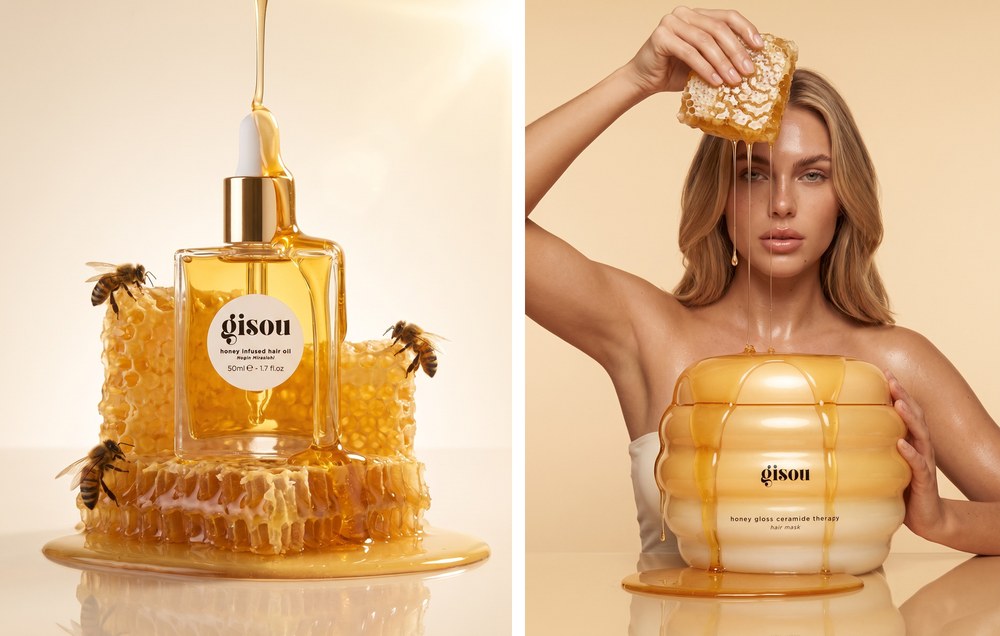
Two images, both generated on Higgsfield from the packshots you already have. One hero for the top of the email, one for the offer. Each one takes two attachments: your product photo, and a photo whose lighting you want to copy.
Generated on HiggsfieldThe email hero on the left, the offer image on the right. Both built from flat packshots.
Step 2Generate the hero
Prompt 2 · the hero image
[Attach your product photo. Attach a second photo whose lighting and styling you want to copy.]
Luxury product photograph. The subject is the [product] from the first reference image, reproduced exactly as shown: [shape, material, color, cap, label]. Do not redesign the product, the label, or the cap.
Place it [in the world your brand lives in: on dripping honeycomb, on a raw plaster ledge, half buried in sand] on a soft [color] seamless backdrop, matching the lighting and composition of the second reference image. [One thing in motion: honey pouring from above the frame, water beading, steam rising.]
Warm [direction] light, soft shadows, no blown-out highlights. High-end editorial campaign photography, macro clarity on the [material], shallow depth of field falling off at the edges. Vertical composition, product centered and dominant.
No added text, no captions, no logos other than what is printed on the product itself. No hands, no people.
Returns the email hero, vertical, 4:5. "Reproduced exactly as shown" and "do not redesign the label" are the two clauses that keep your real product in the frame.
Step 3Generate the offer image
Prompt 3 · the offer image
[Attach the pairing product's photo. Attach a campaign photo whose pose you want to copy.]
Editorial campaign photograph on a seamless [color] backdrop.
A [describe your actual customer, not a supermodel] sits behind a matching tabletop. [Describe the pose from your reference: one raised arm holding something, the other hand resting on the product.] Match the pose, crop and energy of the second reference image.
In front of her, dramatically oversized and scaled to roughly the height of her torso, stands the [pairing product] from the first reference image, reproduced exactly as shown: [shape, surface, gradient, lettering]. Do not redesign it.
[The product's own substance] overflows from it and runs down its sides, pooling on the tabletop with a wet sheen.
Soft even lighting, warm tone, gentle shadow under the product, no harsh contrast. Vertical composition, the oversized product dominant and centered.
No added text, no captions, no logos beyond what is printed on the product.
Returns the offer image, vertical, 3:4. Blowing the product up to human scale is what makes a second product feel like the point of the email rather than an upsell.
How do I get the email laid out?
Hand Claude the four images and your brand rules, and describe the six sections in the order they go. This is one prompt, not a design brief.
Step 4Build the layout
Prompt 4 · the layout
Build my post-purchase email as one page, 1000px wide.
Brand: [palette, display font, body font, where the logo sits]
Attached: [hero image], [offer image], [both product packshots]
In this order, top to bottom:
1. Logo bar, then the hero image full width
2. Order confirmation on white: headline, thank-you line, order number, the product row with price, subtotal, shipping, tax, total, estimated delivery, shipping address
3. The offer: [paste the reason it pairs from prompt 1], then the discount large, then the expiry small underneath it
4. The offer image, full width
5. Product details: image left, product name, one line describing it, original price struck through, discounted price larger and bolder, then the button
6. Countdown timer, then footer nav, social links, legal
Every price has to add up. Show me the arithmetic for the discount and the order total before you build.
Returns the full email. "Show me the arithmetic" is the clause that catches a wrong discount before it is baked into an image you cannot edit.
How do I get it into Klaviyo?
As slices. An email built as one tall image loads badly and cannot be edited, so you cut it into three and stack them as separate image blocks. Every ESP handles this the same way.
Three slicesHero and order details, then the offer and product, then the timer and footer.
Step 5Cut it into slices
Prompt 5 · the slices
Cut the email into three images I can upload to [Klaviyo, Mailchimp, Flodesk, or whichever ESP you use]:
1. Hero and order details
2. The offer, the offer image, and the product details
3. Countdown timer and footer
Export each at 2000px wide as PNG. Cut on the section boundaries so nothing is repeated and nothing is lost. Give me the height of each one so I can check they add up to the full email.
Then write the alt text for each slice. Slice 2's alt text has to carry the offer and the expiry in words.
Returns three PNGs and their alt text. In Klaviyo, drop each into its own image block, stacked in order, and put the link on the block.
The one thing that breaks it: an image-only email is invisible to anyone whose client blocks images, and that is a real share of your list. Which is why slice 2's alt text has to say the discount and the expiry in plain words, and why the button is added in the ESP as a real text button rather than baked into the slice. Everything else can be a picture. The offer and the button cannot.
The email shown throughout is unpaid concept work built for a teaching example. It is not a real brand's email, not commissioned, and not affiliated with any brand. The product photography used as reference is publicly available. Prices, order number, customer name and address in the mockup are invented.
About the strategist
Anne Reyes
Brand & AI strategist · Founder, Brandworks Studios
17 years building brands, and I scaled my marketing agency to 7 figures within 2 years, with clients including Amazon, Pier 1, and Dressbarn. I now build AI marketing systems for e-commerce brands through BAIBE, the Brandworks AI Brand Engine. AI does the production. Taste directs it.
Keep going
Want the next build?
The Chic Strategist breaks down a new AI marketing system every week. Or bring your brand to a strategy call and we'll build it together.